Temenos Forge

TIMELINE

Jan 2020 - Jul 2020

PLATFORM

Responsive App

MY ROLE

UI/UX Designer

Introduction

Temenos Forge (formerly known as Kony Marketplace) is a platform where developers can upload their apps and app's components to make them available to download for others.

My Role

The project was undertaken during my tenure with Kony Labs as a UX/UI designer. It initially started as an internal project but later evolved into a comprehensive customer-centric solution for sharing components built on "Visualizer".

Problem

The mechanism to share apps and app components built on Visualizer addressed several critical issues. Visualizer is a tool to develop hybrid apps and components. Although it enriched with component-based development capabilities, faced difficulties in efficiently shipping individual components. There was a notable absence of a proper mechanism for exporting and importing specific code chunks (components), which hindered collaboration and sharing among developers. Furthermore, even if someone managed to import a component, usability challenges arose due to the lack of comprehensive documentation and authorship details, making it challenging for users to effectively utilize these components. Lastly, the Visualizer lacks a version control mechanism as well. There was a urgent need to make a platform that should overcome these issues.

Goal

The goal of the project to create a platform for developers to share apps and app components built on Visualizer is to address the following objectives and challenges:

Impact

  1. Enhanced Developer Productivity: Developers can leverage shared components, resulting in a 30% increase in productivity by reducing redundant work and speeding up development.
  2. Improved Collaboration: The platform fosters collaboration among developers, leading to a 35% increase in collaborative development efforts and cross-pollination of ideas.
  3. Wider Adoption of Visualizer: A thriving ecosystem of shared components can attract more developers, resulting in a 20% growth in the user base of Visualizer.
  4. Knowledge Sharing: Developers benefit from comprehensive documentation and authorship details, resulting in a 25% improvement in knowledge sharing and skills development.
  5. Reduced Development Costs: Developers can access shared components, leading to a 10-15% reduction in development costs as they avoid reinventing common functionalities.
  6. Enhanced Software Quality: Introduction of version control ensures a 15-20% improvement in code quality and stability.
  7. Increased Innovation: Collaboration and the availability of shared components can spark innovation, resulting in a 30% increase in innovative solutions created by building upon existing work.
  8. Community Growth: The project can help build a vibrant developer community around Visualizer, fostering networking, mentorship, and support, leading to a 55% growth in the developer community.
  9. Business Opportunities: Developers can explore new business opportunities, such as component sales or licensing, resulting in a 10-15% increase in potential revenue streams.
  10. Competitive Advantage: Organizations using Visualizer gain a competitive advantage, with a 40% edge due to faster product delivery and access to a rich repository of components.

Final Designs

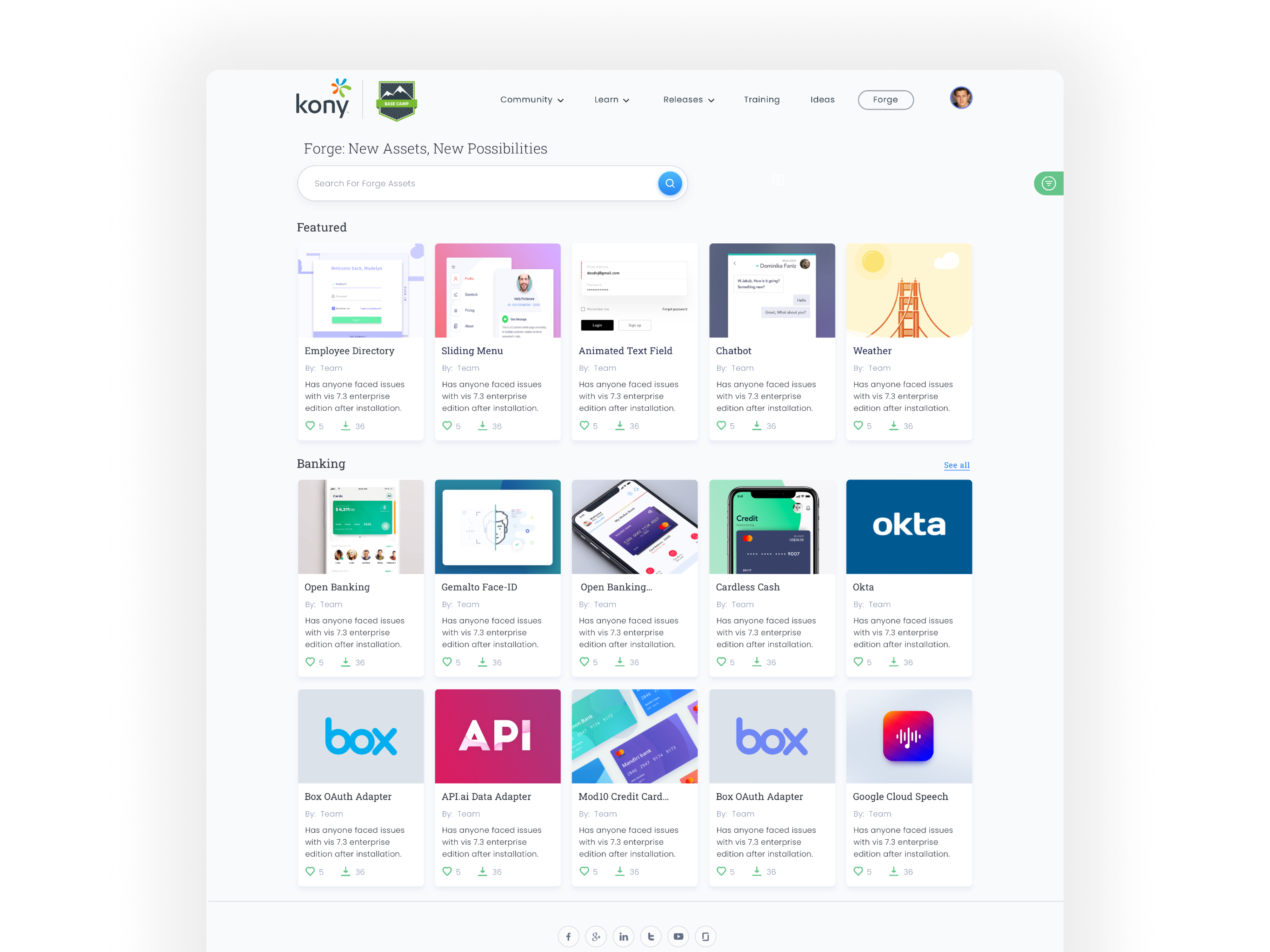
Homepage: Listing

  1. Showcase featured and categorised top components.
  2. User can search, filter and show all results based on a particular category from here.

Homepage: Filter and Search

  1. Filter panel can be open by clicking on the side filter button
  2. Filter can be applied based on Domain, Category, Platform, and tags
  3. User can search, filter and show all results based on a particular category from here.

Details Page

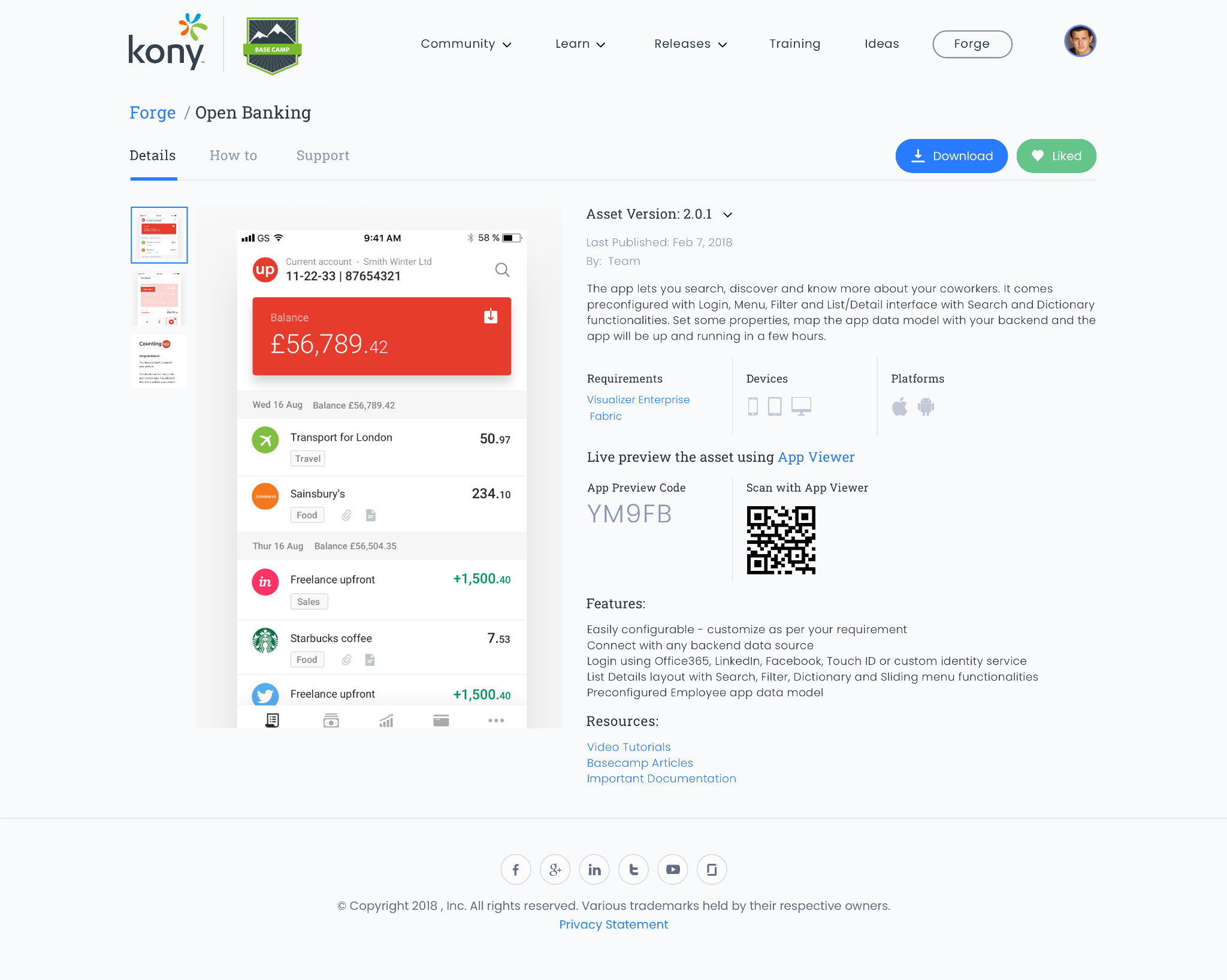
  1. All of the important meta information like basic info, usage, supported platforms, and other resources are presented here.
  2. GIFs and Screenshots are present here as well to help the user in getting a brief idea of the view even before actual usage.
  3. By scanning the given QR code in supported app, the user can even interact with the component live in action.

Support Page

  1. User can view all the queries asked related to the given component.
  2. User can always ask a new query if he/she unable to find the solution.
Upload Page

  1. Anyone can upload a new component but it will go through a strict moderation process for approval before it become live for public.
  2. Once the component is approved, it will become available for the public to us.

Development

Detailed Design Specifications: Provide the developer with comprehensive design specifications that include measurements, color codes, fonts, and detailed guidelines for implementing the UI. This ensures that the developer has clear instructions for translating design elements into code.

Asset Delivery: Deliver all design assets, such as icons, images, illustrations, and animations, in the required formats and sizes for implementation. Organize these assets in a way that is easily accessible to the developer.

Interaction Design Clarification: Explain any interactive elements and transitions that may not be immediately apparent from static designs. Describe how animations, hover effects, or other interactive features should function.

Feedback and Iteration: I addressed questions and taken feedback from the developer during the implementation phase. I collaborated with developers to make necessary adjustments or clarifications to ensure the final product aligns with the intended design.

Consistency Checks: Continuously monitor the development progress to ensure design consistency across different parts of the application. Address any discrepancies promptly.

More to Explore